
EncryptPro vs VeraCrypt:
Which Encryption Tool Is Right
For Your Workflow.
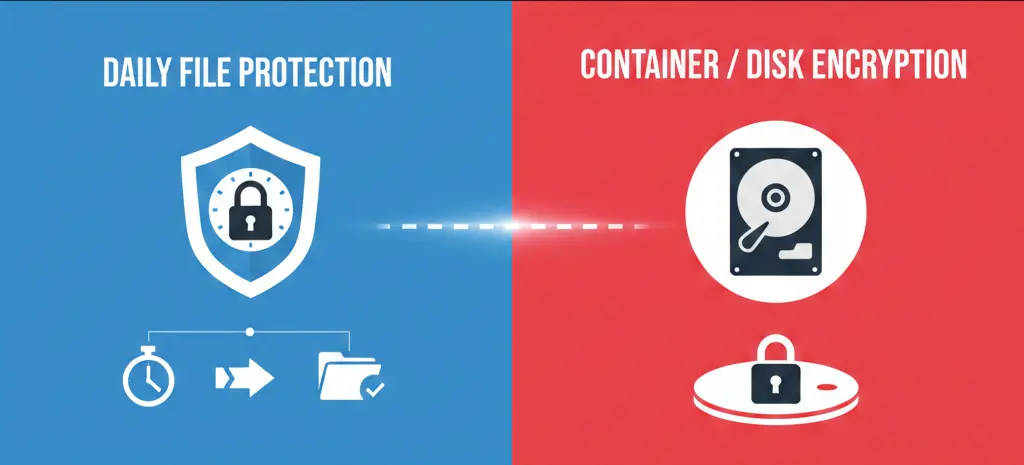
Both EncryptPro and VeraCrypt deliver military-grade AES-256 encryption with zero-knowledge architecture. But they're designed for fundamentally different use cases. This honest comparison helps you understand where each tool excels—and which one fits how you actually work.
Quick Verdict: Which One Is Right for You?
| Your Need | Best Choice | Why |
|---|---|---|
| Full-disk or partition encryption | VeraCrypt | Purpose-built for encrypting entire drives and system partitions |
| Easy file & folder encryption | EncryptPro | Easily encrypt files & folders without complex setup and containers |
| Editing encrypted files frequently | EncryptPro | Double click any encrypted file to open/view/edit |
| Data-in-use security | EncryptPro | Only single requested file decrypted at runtime in secure memory |
| Open-source requirement | VeraCrypt | Fully open-source |
| Simple right-click encryption | EncryptPro | Zero learning curve, Windows-native integration |
| Cross-platform use (Mac/Linux) | VeraCrypt | Available on Windows, macOS, and Linux |
| Hidden volumes & plausible deniability | VeraCrypt | Advanced security features for sensitive scenarios |
| Guaranteed data access | EncryptPro | Viewer Mode ensures permanent access, no data loss risk due to header corruption |
| Zero-knowledge local encryption | Both | Keys never leave the system |
| Cloud sync with frequent file updates | EncryptPro | Works seamlessly with cloud storage — edited files sync normally without re-uploading large encrypted containers |
| Customer support | EncryptPro | 24/7 support vs. community forums only |
💡 Key Insight
This isn't about "better" or "worse"—it's about design philosophy. VeraCrypt is a power tool for advanced users, while EncryptPro is a VeraCrypt alternative precision-engineered for everyday workflow protection.
VeraCrypt Overview
VeraCrypt is a free, open-source encryption tool widely trusted by security professionals and privacy advocates worldwide.
Where VeraCrypt Excels
- Full-disk and partition encryption
- Encrypted containers for secure archival storage
- Hidden volumes and plausible deniability
- Open-source transparency with public audits
- Cross-platform support (Windows, Linux, macOS*)
Best Suited For
- Advanced or technical users
- Security professionals and researchers
- Long-term or infrequently accessed data storage
- Users comfortable managing backups, headers, and recovery processes
- Those requiring maximum transparency through open-source code
* Note: macOS support requires additional setup and may have limited functionality compared to Windows/Linux versions.
Common Challenges Users Report with VeraCrypt
Important Framing: VeraCrypt is cryptographically sound and well-designed—for its intended use case. However, its container-based architecture creates friction points when used for daily file encryption. Here's what users frequently report:
Challenge 1: Container-Based Workflow Disruption
The Issue
VeraCrypt requires files to live inside encrypted containers (virtual drives). To access any file, you must mount the entire container first.
Why It Happens
This is by design. VeraCrypt treats encryption as creating secure vaults, not protecting files where they naturally exist.
Real-World Impact
- Single-file access requires mounting entire volumes – Need to edit one document? Mount a 500GB container.
- Files don't stay in their natural folders – Your Desktop file now lives inside F:\ drive when mounted.
- 30-45 seconds added to every file access – Research shows knowledge workers lose 90+ hours annually to mounting overhead.
- Can't resize containers after creation – Guessed wrong on container size? Create a new one and migrate everything.
Challenge 2: "All-or-Nothing" Security Model
The Issue
Once you mount a VeraCrypt container, every file inside becomes accessible—including to malware running on your system.
Why It Happens
Containers unlock completely. There's no selective access to individual files within a mounted volume.
Real-World Impact
- Malware can exfiltrate all data from mounted volumes during active sessions.
- Can't selectively unlock just "work files" vs. "financial files".
- Must choose: convenience (keep mounted) or security (constant remounting).
Security Context
BitLocker has this same limitation—VeraCrypt's documentation acknowledges this. It protects data-at-rest, not data-in-use.
Challenge 3: Catastrophic Failure Scenarios
The Issue
Container corruption can make entire volumes permanently inaccessible. Multiple users have documented complete data loss.
Why It Happens
Containers concentrate risk. If the container header corrupts—from power loss, system crash, improper dismount, or hardware failure—the entire volume can become unreadable.
Documented User Reports
Data Loss from Header Corruption: A Reddit user described mounting and dismounting a VeraCrypt volume on an external HDD, after which Windows suggested running chkdsk. After the check, approximately 500GB of data vanished despite no crashes or power issues. Community responses highlighted header corruption risks and the critical importance of backup rescue disks.
Password Rejection After System Interruptions: Another user reported that after a system reset attempt on a 4TB VeraCrypt volume, the correct password was rejected, confirming total data loss with no recovery path. Multiple commenters shared similar experiences of encryption-in-progress failures leading to bricked volumes.
System Freezes During Encryption: During non-system drive encryption, users report complete system freezes requiring hard resets, raising concerns about silent data corruption even when volumes later remount successfully.
Hidden Volume Overwrites: A hidden VeraCrypt volume became corrupted when the outer volume partially overwrote it, rendering files inaccessible despite successful mounting—prompting a $100 ETH recovery bounty.
Important Context
VeraCrypt's own documentation strongly recommends:
- Creating header backup rescue disks immediately
- Maintaining frequent external backups
- Never interrupting encryption processes
- Proper dismounting before unplugging drives
These precautions exist because container corruption is an acknowledged architectural risk. For users who forget any of these steps, data loss can be permanent.
Challenge 4: Steep Learning Curve
The Issue
A 2025 usability study found VeraCrypt's complexity prevents successful setup without external help and takes over 6x longer than competing tools.
What Users Must Learn
- Understanding containers vs. volumes vs. partitions
- Difference between file containers and partition/device encryption
- What "hidden volumes" mean and how to avoid overwriting them
- Creating and storing header rescue disks
- Safe mounting/dismounting procedures
- PIM (Personal Iterations Multiplier) settings
- Hash algorithm selection
- When to use quick vs. full format
Support Reality
Community forums and Reddit only. No direct customer support. If you're stuck, you're researching solutions yourself.
Challenge 5: Ecosystem Compatibility Issues
Real-World Breakdowns
Cloud Backup Services: Backblaze ended VeraCrypt support without notice, suddenly labeling volumes as "unplugged." Years of trusted backup workflows broke overnight. Other cloud services struggle with container files appearing as external drives.
Cross-Platform Challenges: Users report Linux USB-hosted VeraCrypt drives rejecting correct passwords, presuming total loss in cross-OS scenarios due to FUSE/kernel mismatches.
EncryptPro's Approach
Native Windows integration means:
- Encrypted files backup normally to any cloud service (as ciphertext)
- No mounting issues with backup software
- Files remain standard Windows files (just encrypted)
- Multi-device access works seamlessly across Windows 10/11
Challenge 6: Performance Degradation
The Issue
VeraCrypt can cause significant system slowdowns, particularly on mechanical hard drives and during random I/O operations.
Why It Happens
VeraCrypt's encryption driver creates overhead across entire volumes. The architecture uses "bursting" I/O where speeds initially appear normal but then drop dramatically during sustained use.
Documented User Reports
Bursting I/O Issues: Users report write speeds plummeting to just 5MB/s despite drives capable of 50x more, with slowdowns affecting even other volumes on the system.
System Encryption Slowdowns: After encrypting a mechanical HDD, one user experienced excruciatingly slow performance making everyday tasks unbearable, even with hardware acceleration enabled.
Real-World Impact
- Mechanical HDDs can drop to 5-10MB/s during normal use
- Dramatically increased boot times
- System-wide slowdowns affecting all applications
- Some users report noticeable impact even on SSDs
EncryptPro's Difference
Individual file encryption means no full-volume driver overhead—only active encrypted files have minimal processing impact. System and unencrypted files run at full native speed.

EncryptPro: Encryption Designed for How You Actually Work
EncryptPro is designed for people who work with sensitive files every day and want encryption without changing their workflow.
The Core Philosophy
Most encryption tools force you to adapt to them. EncryptPro adapts to you.
Design Goals
- Encrypt files and folders in place
- Enable on-the-fly editing in native apps
- Minimize failure scope
- Guarantee permanent access to encrypted data
- Zero workflow disruption
- Single-file security model
How It Works
Right-Click Any File or Folder
Select "Encrypt with EncryptPro" from the context menu
Files Stay Exactly Where They Are
Desktop file stays on Desktop (just encrypted)
Double-Click to Open
Edit in Word, Excel, Photoshop—whatever app you use
Auto-Saves Encrypted
Close the file, it re-encrypts automatically
Group-Based Unlocking: Unlock "Work" category once, access all work files. No repetitive password entry for related files.
Real-World Workflow: A Day in the Life
Same goal (protect sensitive files). Dramatically different daily experience.
Scenario: You're a freelance consultant accessing encrypted files throughout the day.
| Aspect | VeraCrypt | EncryptPro |
|---|---|---|
| Initial Setup |
30-45 min
Learn containers, create volume, move files, create rescue disk
|
2 min
Install → Set password → Right-click encrypt
|
| Accessing Files |
30-45 sec each time
Mount container → Navigate to virtual drive → Open file → Dismount
|
2 sec
Double-click file in original location
|
| Editing Workflow | Mount → Edit → Save → Dismount for every session | Edit normally → Auto-re-encrypts on save |
| File Location | Files moved inside F:\ virtual drive | Files stay in Desktop, Documents—wherever you put them |
| Daily Time Cost |
~3 minutes
Mounting/dismounting
|
~10 seconds
Unlock group once
|
| Annual Time Cost |
90+ hours
Managing containers
|
~1 hour total
|
| Security Model | All files in container exposed when mounted | Selective group unlocking—only expose what you're working on |
| Mental Load | Remember to dismount, risk of improper dismount = data loss | Zero—just work normally |
Bottom Line
VeraCrypt adds 30-45 seconds to every file access. EncryptPro adds zero seconds after initial group unlock.
Time Savings
~89 hours per year with EncryptPro vs. VeraCrypt for knowledge workers.
Where EncryptPro May Not Be the Best Fit
Honest limitations
EncryptPro is intentionally focused on daily file protection and does not try to cover every encryption scenario.
Windows-only
Currently only available for Windows 10/11.
No full-disk encryption
Not designed for system partitions or complete drive encryption like VeraCrypt offers.
No hidden volumes
Does not include plausible deniability features or hidden volume capabilities.
Not open-source
Source code is not publicly available for independent verification.
For users who need full-disk encryption, cross-platform support, or advanced deniability features, VeraCrypt remains the better choice.
Pricing, Support & Long-Term Access
| Category | EncryptPro | VeraCrypt |
|---|---|---|
| Price | Free / $5 per month (Pro version) | Free (Forever) |
| Support |
24/7 customer support Direct email and Live Chat |
Community forums Reddit and volunteer support |
| Free tier |
Unlimited file encryption All core features included |
Full access 100% free, no restrictions |
| Long-term access |
Viewer Mode guarantee Always access your files, even if subscription lapses |
Backup-dependent Requires proper header and key backups |
Editorial framing: VeraCrypt offers powerful features at no cost but relies on user expertise and community support. EncryptPro trades openness and scope for usability, support, and guaranteed data access.
Final Recommendation
Choose VeraCrypt if:
- You need full-disk or partition encryption
- You're comfortable managing containers, headers, and backups
- You require open-source software
- You need cross-platform support (Windows, macOS, Linux)
- You require hidden volumes and plausible deniability
Choose EncryptPro if:
- You encrypt files and folders daily
- You want encryption without changing your workflow
- You want data-in-use protection, not just data-at-rest
- You want guaranteed access to your encrypted files
- You value simplicity, performance, and direct support
- You work primarily on Windows systems
Try EncryptPro Free — Unlimited File Encryption
No containers. No lock-in. Your files stay yours. Experience encryption designed for how you actually work.
Download EncryptPro FreeRest easy knowing your data is safe, Grab EncryptPro Today - For simple stress-free security!